COSGrid Z3 App Connector Onboarding Guide:
The COSGrid Z3 App Connector enables secure connectivity between your private applications and the COSgrid platform. Once onboarded, the connector establishes a trusted communication channel with the orchestrator and becomes available for application mapping and policy enforcement.
Navigation Path
To begin onboarding, navigate through the platform using the following path:
Sidebar → Organisation → Onboarding → App Connector Onboard
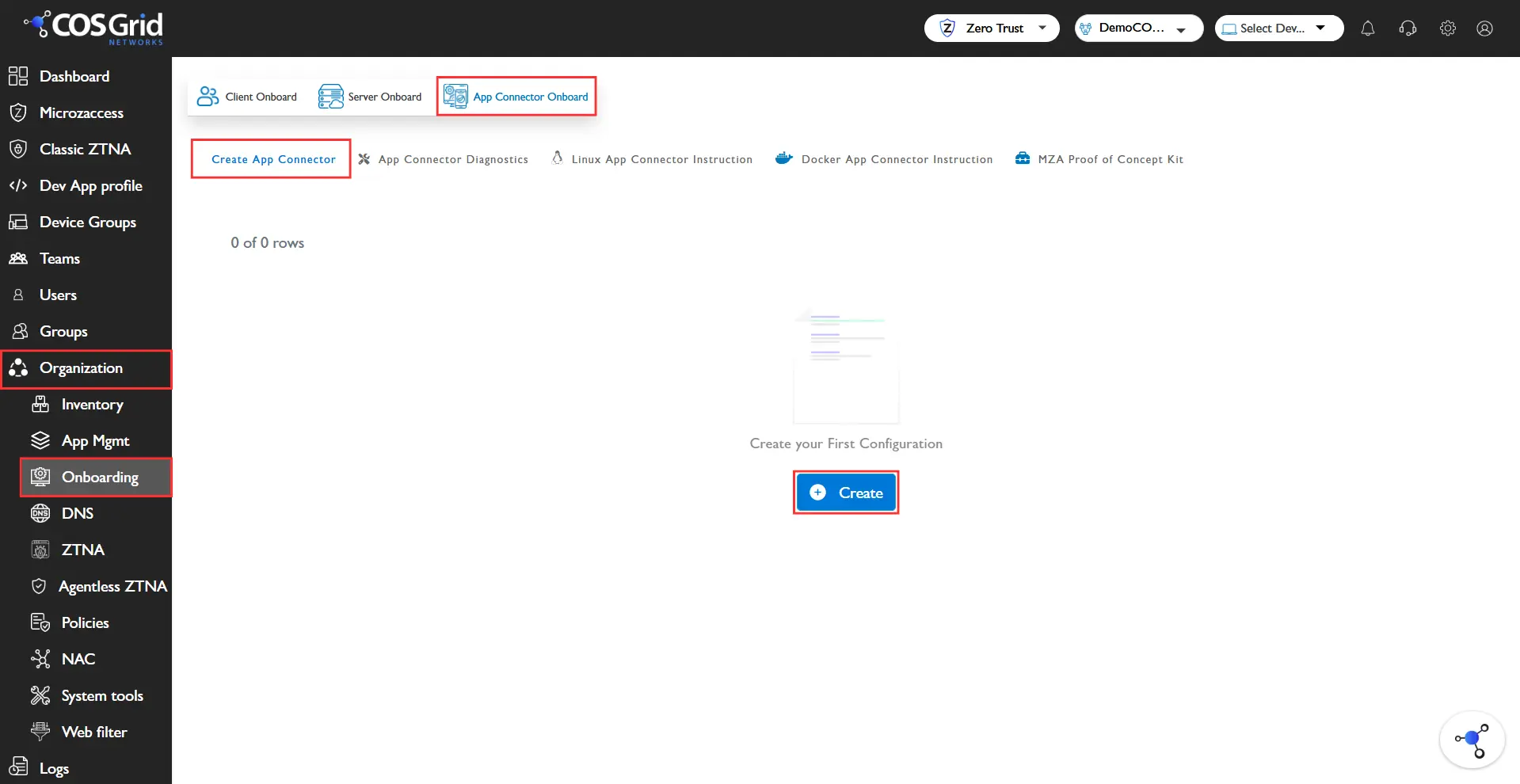
Onboarding Steps
1. Access the App Connector Onboard Page
From the sidebar, go to Organisation
Click on Onboarding
Select App Connector Onboard
2. Add a New App Connector
Click on the “Add” button
An input form will appear
3. Enter Connector Details
Ensure all details are accurate to avoid configuration issues.
4. Submit the Configuration
Click on “Add” to complete onboarding
5. Verify Onboarding
The newly onboarded App Connector will appear in the Connectors Table
Verify the following:
Status: Active / Pending
Correct name and configuration
Last updated timestamp
Post-Onboarding
After onboarding:
Deploy the App Connector on your VM/server using the provided installer
Register the connector with the COSgrid platform
Assign applications and policies
Verify connectivity status
Important Notes
Ensure the connector is deployed in the correct network environment
Outbound connectivity (port 443) must be allowed
Connector status will remain Pending until successfully installed and registered
Avoid duplicate connector names for easier management
Next Steps
Install the App Connector on your infrastructure
Map internal applications to the connector
Configure access policies
Test application access from endpoints
Once onboarded, the COSGrid Z3 App Connector acts as a secure bridge, enabling Zero Trust access to your internal applications without exposing them to the public internet.